
Desktop accounting software you buy once.
AcboBooks keeps your books on your own computer, not someone else's server. Invoicing, bills, bank feeds, payroll for the US and Canada, inventory and multi-currency are all included, for one price with no monthly fee.
Trial needs no card or account · 30-day money-back guarantee · Windows 10 & 11
$399.99
one-time, per business
2
computers included
Unlimited
user logins
US + Canada
payroll built in
What it handles
The whole back office, in one install.
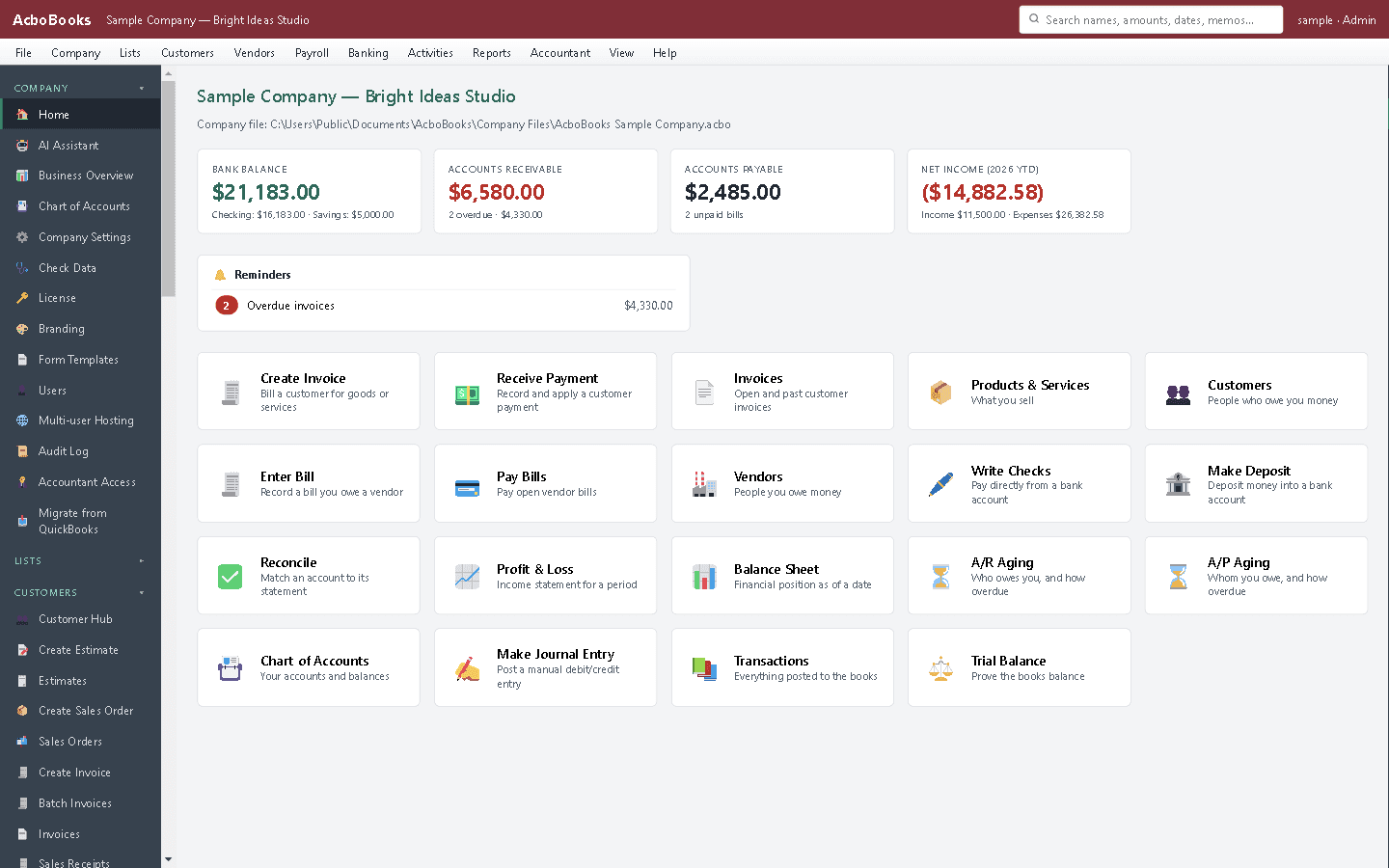
If you've used QuickBooks Desktop, AcboBooks will feel familiar: a home screen with your bank balance, what customers owe you and what you owe, and one-click shortcuts to the jobs you do every day.
Invoices & estimates
Progress billing, credit memos, statements, sales receipts and PDF email, with overdue tracking so nothing slips.
Bills & payments
Enter bills, pay them in batches, print cheques and track vendor credits. Aging updates on its own.
Bank feeds & reconciling
Connect with OFX Direct Connect or import statements, match transactions with rules, then reconcile.
Payroll, both countries
US and Canadian payroll with year-end forms: W-2 e-file output, T4s, PD7A and Record of Employment.
Reports accountants expect
Profit & loss, balance sheet, trial balance, aging and sales tax reports, exportable to Excel, CSV or PDF.
USD and CAD
Invoice and pay in either currency. Exchange rates are stored on each document, and gains and losses post automatically.
Inventory, jobs & classes
Average-cost inventory, customer jobs, and classes for departments or locations.
Multi-user on your network
One computer hosts the file and the rest of the office connects over your network. No cloud in the middle.
Backups & audit trail
Automatic backups, integrity checks, closed-period locks and a full change log.
Coming from QuickBooks Desktop?
Bring your lists and open balances over in an afternoon.
AcboBooks imports from any QuickBooks Desktop edition through an IIF export, and reads open invoices and bills live from QuickBooks Desktop 2019 or later. It backs up first and never writes to your QuickBooks file.
What comes over
- Chart of accounts, with your account numbers
- Customers, vendors and employees, with balances
- Items, including inventory quantity and cost
- Classes and jobs
- Open invoices and bills, so aging still works
What stays in QuickBooks (for now)
- Past transaction history (only balances as of your start date come over)
- Payroll setup and paycheck history
- Memorized reports, custom templates and attachments
- Bank feed connections (you reconnect them in AcboBooks)
Pricing
One price. No subscription.
Free trial
$0 for 15 days
- Every screen, on your real company file
- Up to 100 transactions
- No card, no account
- Unlock with a license key, nothing lost
Windows 10 & 11. No sign-up needed.
AcboBooks Pro
$399.99 one-time
- One business, 2 computers, unlimited user logins
- Payroll, bank feeds, multi-currency, inventory
- 12 months of updates and email support
- Extra computers $149.99 each, paid once
- 30-day money-back guarantee
Card, PayPal, Apple Pay, Google Pay, or pay by invoice. Prices in USD.
Still deciding?
AcboBooks or QuickBooks Desktop?
We sell both, so we'll be straight with you. Plenty of businesses are better off with QuickBooks, and we'll tell you if you're one of them.
AcboBooks is a good fit if…
- • You want to pay once and own it
- • You run payroll in the US or Canada and don't want a payroll subscription
- • You bill in both USD and CAD
- • Your office is on Windows
Stick with QuickBooks if…
- • Your accountant works in QuickBooks and wants it that way
- • You need a Mac version today
- • You rely on QuickBooks add-on apps
- • You need years of transaction history in one file
Questions people ask
What does one license cover?+
One business on up to two computers, with unlimited user logins. Each extra computer is $149.99, paid once. A separate legal entity needs its own license.
What happens after the first 12 months?+
Your version keeps working. It doesn't expire. Renewing updates is optional, but you'll want it for newer versions and each year's payroll tax tables.
How does the free trial work?+
Download it, no card or account needed. You get every screen on your real company file for 15 days, up to 100 transactions. Printed documents show a "Trial" mark. On day 16 the file opens read-only, and pasting a license key unlocks it. Nothing is lost.
Does it need the internet?+
Only once to activate, then it works offline. It checks the license about once a day when you happen to be online.
Does my accountant need a license?+
No. Give them a copy of the file or add them as a user on your network.
Is there a Mac version?+
Not yet. AcboBooks runs on Windows 10 and 11, and a Mac version is listed as coming soon. If you need Mac today, QuickBooks Desktop for Mac is the option.
Can I pay in Canadian dollars?+
Prices are in US dollars, and your card issuer converts them to CAD.
What if it isn't right for me?+
There's a 30-day money-back guarantee. Ask within 30 days of purchase for a full refund.
Try it on your own books, free for 15 days.
No card. If you buy later, everything you entered is still there.
AcboBooks accounting software is our own product, published by AcboBooks LLC. Purchases are completed on acbobooks.com. QuickBooks® and Intuit® are trademarks of Intuit Inc.; AcboBooks is not affiliated with Intuit.